 Skip to content


Selecting the right WordPress hosting for business determines whether your website becomes a revenue-generating asset or a performance liability that costs customers and credibility. The hosting infrastructure you choose impacts site speed, uptime reliability, security posture, and scalability potential factors that directly influence search rankings, conversion rates, and customer trust. According to 2025-2026 benchmark testing, top-performing WordPress hosting providers maintain 99.99-100% uptime with average response times under 400 milliseconds1, while poorly configured hosting creates performance bottlenecks that even the best content and design cannot overcome.
Your business model dictates hosting requirements more than any other factor. A personal blog with 1,000 monthly visitors demands vastly different infrastructure than an e-commerce store processing hundreds of daily transactions or a membership site serving premium content to subscribers. WP Enchant works with businesses across industries, consistently observing that hosting misalignment either over-provisioning resources or under-estimating requirements represents one of the most common yet easily preventable causes of WordPress site failures.
Understanding How Business Models Determine WordPress Hosting Requirements

Different business models generate distinct traffic patterns, resource consumption profiles, and performance expectations that hosting infrastructure must accommodate to deliver optimal user experiences and operational reliability. A content blog with steady traffic behaves fundamentally differently than an e-commerce site experiencing seasonal spikes or a SaaS platform requiring constant database interactions and API integrations.
Business hosting requirements extend beyond simple visitor counts to encompass transaction processing capabilities, database performance under concurrent user loads, security standards for payment processing, and backup frequency matching business continuity needs. These operational characteristics determine whether shared hosting’s resource limitations suffice or whether VPS and cloud solutions become operational necessities rather than premium luxuries.
WordPress Hosting Requirements by Business Model:
| Business Model | Typical Traffic | Resource Needs | Hosting Type | Key Priorities |
|---|---|---|---|---|
| Portfolio/Personal Blog | 500-5,000 monthly visitors | Low CPU, moderate storage | Shared hosting | Cost efficiency, ease of use |
| Small Business/Services | 5,000-25,000 monthly visitors | Moderate CPU, moderate storage | Managed shared or entry VPS | Reliability, professional email |
| E-commerce (Startup) | 10,000-50,000 monthly visitors | High CPU, high database performance | VPS or managed WordPress | Security, transaction reliability |
| E-commerce (Growing) | 50,000-200,000+ monthly visitors | Very high CPU, database optimization | Cloud hosting or dedicated VPS | Scalability, 24/7 availability |
| Membership/Subscription | Varies by model | High database, user session management | VPS or cloud hosting | User experience consistency |
| Enterprise/High-Traffic | 200,000+ monthly visitors | Maximum resources, redundancy | Dedicated servers or enterprise cloud | Performance SLAs, custom configuration |
Understanding your current business model and growth trajectory prevents two common hosting mistakes: selecting infrastructure that cannot scale with business growth, requiring disruptive migrations during peak operational periods, or over-investing in enterprise solutions that deliver marginal benefits for small-scale operations while diverting resources from marketing and product development.
Portfolio sites and personal blogs typically thrive on quality shared hosting that provides sufficient resources for modest traffic levels while minimizing technical complexity. These sites prioritize cost efficiency and ease of management over raw performance metrics, making managed shared hosting from reputable providers an optimal starting point.
E-commerce operations require hosting infrastructure that maintains consistent performance during traffic spikes while providing security features essential for payment processing and customer data protection. Transaction reliability becomes paramount—a 500-millisecond delay in page load times can reduce conversion rates by 7%, while site downtime during promotional campaigns directly translates to lost revenue2.
WP Enchant helps businesses assess hosting requirements based on realistic traffic projections, feature requirements, and growth expectations rather than marketing claims and feature checklists that obscure critical performance differences between hosting tiers and providers.
Comparing Shared Hosting vs VPS vs Cloud Hosting for WordPress Business Sites
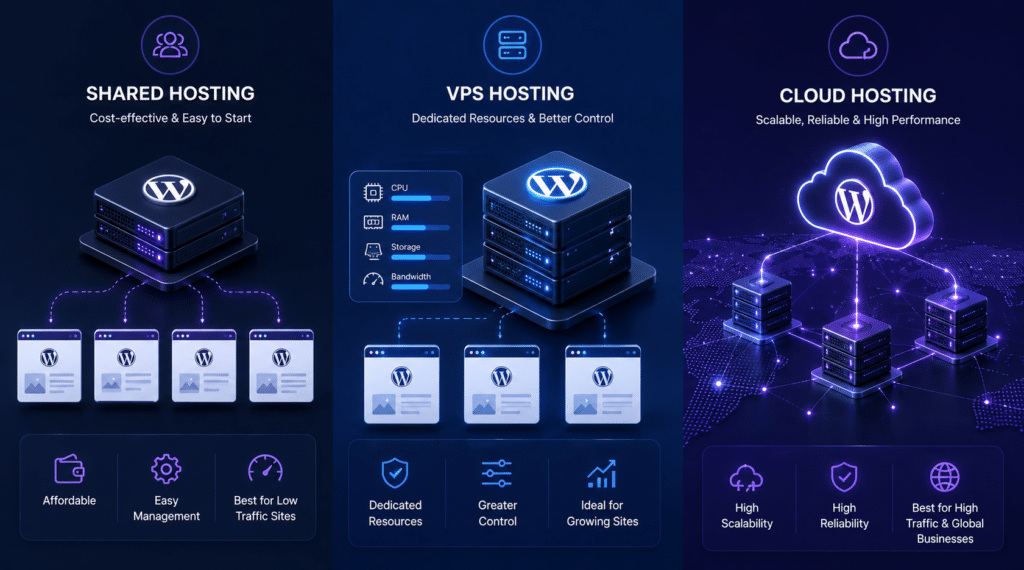
Shared hosting, VPS hosting, and cloud hosting represent fundamentally different infrastructure approaches with distinct performance characteristics, resource allocation models, and scaling capabilities that align with specific business operational requirements. Understanding these architectural differences enables informed decisions based on technical needs rather than marketing terminology and promotional pricing that obscures total cost of ownership.
Shared hosting places multiple websites on single physical servers, dividing available processors, memory, and storage between all hosted sites. This resource-sharing model delivers affordability but creates performance variability when neighboring sites consume disproportionate resources during traffic spikes or inefficient plugin execution. Shared hosting works effectively for sites with predictable, modest traffic that rarely experiences concurrent user surges.
VPS (Virtual Private Server) hosting partitions physical servers into isolated virtual environments, each with dedicated CPU cores, RAM allocation, and storage capacity. This isolation eliminates “noisy neighbor” performance degradation while providing root access for custom configuration and software installation. VPS delivers consistent performance and significantly better security compared to shared hosting, though it requires moderate technical knowledge for server management unless paired with managed services.
Cloud hosting distributes websites across multiple interconnected servers, dynamically allocating resources based on real-time demand. This architecture provides superior reliability through redundancy—if one server fails, others automatically assume the workload without service interruption. Cloud hosting excels at handling traffic variability and scaling resources instantly during promotional campaigns or viral content events.
Performance and Reliability Comparison:
| Hosting Type | Average Response Time | Uptime Reliability | Traffic Spike Handling | Resource Consistency |
|---|---|---|---|---|
| Shared Hosting | 200-600ms | 99.5-99.9% | Poor (affects all sites on server) | Variable (depends on neighbors) |
| VPS Hosting | 100-300ms | 99.9-99.99% | Good (dedicated resources) | Consistent (isolated allocation) |
| Cloud Hosting | 50-250ms | 99.95-100% | Excellent (auto-scaling) | Dynamic (scales with demand) |
Benchmark testing from Q4 2025 demonstrates significant performance differences between hosting types. Premium managed WordPress providers like Pressable and WordPress.com achieved 100% uptime with sub-200ms response times, while budget shared hosting frequently recorded 99.5-99.8% uptime with response times exceeding 500 milliseconds during peak usage1.
Shared hosting suits businesses in early stages with limited budgets and modest traffic expectations. However, the transition point from shared to VPS typically occurs around 10,000-15,000 monthly visitors or when site performance noticeably degrades during normal business hours. WP Enchant recommends proactive upgrades before performance issues impact customer experience rather than reactive migrations triggered by support tickets and negative reviews.
VPS hosting provides the optimal balance between performance, control, and cost for most growing businesses. The dedicated resource allocation ensures consistent page load speeds regardless of time-of-day traffic patterns, while root access enables custom security hardening and performance optimization impossible on shared infrastructure. Managed VPS services eliminate technical complexity while preserving performance benefits, making them ideal for businesses lacking dedicated IT personnel.
Cloud hosting represents the premium tier appropriate for established businesses with significant traffic volumes, variable demand patterns, or zero-tolerance for downtime. E-commerce sites experiencing seasonal fluctuations, membership platforms with synchronized user activity, and content sites prone to viral traffic spikes benefit most from cloud hosting’s elastic scaling and redundancy architecture.
Benchmarking WordPress Hosting Performance: Speed and Uptime Testing
Objective performance testing through standardized benchmarks reveals the actual capabilities of hosting infrastructure beyond marketing claims, providing empirical data for comparing providers and validating upgrade decisions. Most hosting companies advertise “99.9% uptime guarantees” and “blazing-fast performance,” yet independent testing consistently exposes significant performance disparities that impact user experience and search rankings.
Uptime percentage calculations reveal substantial differences in actual availability. A 99.9% uptime guarantee permits 43.8 minutes of downtime monthly, while 99.99% allows just 4.38 minutes—a tenfold difference that significantly impacts revenue for e-commerce operations and SaaS platforms where every minute offline directly reduces income3.
Time to First Byte (TTFB) measures server response speed before any content transfers, reflecting database query performance, server processing capability, and network latency. TTFB under 200 milliseconds indicates excellent server performance, 200-400ms represents acceptable performance for shared hosting, while TTFB exceeding 500ms signals infrastructure problems requiring investigation or upgrade.
2025-2026 WordPress Hosting Performance Benchmarks:
| Provider | Q4 2025 Uptime | Average TTFB | Load Test Response | Monthly Downtime |
|---|---|---|---|---|
| Pressable | 100.00% | 155ms | 78ms under load | 0 minutes |
| WordPress.com | 100.00% | 180ms | 92ms under load | 0 minutes |
| InMotion Hosting | 99.99% | 210ms | 108ms under load | 4.3 minutes |
| SiteGround | 99.96% | 632ms | Variable | 17.3 minutes |
| Budget Shared Average | 99.85% | 450-650ms | 500ms+ under load | 65 minutes |
Load testing simulates concurrent user sessions to evaluate how hosting infrastructure performs under realistic traffic conditions. Sites that maintain response times below 300 milliseconds during load testing demonstrate adequate resource provisioning for growth, while those showing exponential response time increases under moderate loads indicate capacity constraints requiring infrastructure upgrades.
WP Enchant implements comprehensive hosting performance monitoring for client sites, tracking uptime patterns, TTFB trends, and user experience metrics including Largest Contentful Paint (LCP) and Interaction to Next Paint (INP). This data-driven approach identifies performance degradation before it impacts conversion rates and search rankings.
Load testing tools like K6, Apache JMeter, and LoadStorm provide objective performance data, though interpreting results requires understanding normal usage patterns for your specific business model. An informational blog with mostly anonymous page views generates fundamentally different server loads than a membership site with authenticated users accessing personalized dashboards and dynamic content.
Database performance particularly impacts WordPress sites using WooCommerce, membership plugins, or custom post types with complex queries. VPS and cloud hosting’s superior database optimization and dedicated memory allocation deliver measurable performance improvements for database-intensive applications that shared hosting cannot match regardless of optimization efforts.
CDN Implementation Strategy for Business WordPress Sites
Content Delivery Networks distribute static assets across globally distributed edge servers, reducing latency by serving content from locations geographically closer to users while offloading bandwidth demands from origin hosting infrastructure. CDN implementation represents one of the highest-impact performance optimizations for businesses serving international audiences or operating content-heavy WordPress sites with substantial image and video assets.
CDNs cache static resources including images, CSS stylesheets, JavaScript files, and downloadable content on edge servers positioned worldwide. When users request your site, static assets load from the nearest edge server while dynamic content still generates from your WordPress hosting server. This distribution reduces server load, decreases bandwidth consumption, and improves page load speeds particularly for distant users accessing sites hosted on servers in other continents.
Modern CDN providers offer additional performance and security features beyond basic caching including DDoS protection, web application firewalls, bot mitigation, image optimization, and automatic format conversion to next-generation image formats like WebP and AVIF. These value-added features make CDN implementation essential for business sites rather than optional performance enhancement.
CDN Provider Comparison for WordPress:
| CDN Provider | Free Tier | Bandwidth Cost | Global PoPs | WordPress Integration | Best For |
|---|---|---|---|---|---|
| Cloudflare | Unlimited bandwidth | Free (paid plans $20+/mo) | 310+ locations | Excellent (official plugin) | Budget-conscious businesses |
| Bunny CDN | 25GB free | $0.01/GB ($1/mo minimum) | 120+ locations | Good (via plugins) | Growing sites with increasing traffic |
| Fastly | No free tier | Volume pricing | 100+ locations | Custom integration | Enterprise applications |
| CloudFront (AWS) | 1TB free first year | $0.085/GB average | 450+ locations | Moderate complexity | AWS ecosystem users |
Cloudflare’s free tier provides unlimited bandwidth with basic DDoS protection, making it the default CDN choice for small businesses and startups. The official WordPress plugin simplifies setup to API key entry and automatic configuration, delivering performance improvements within minutes of activation. Paid Cloudflare plans ($20-200+ monthly) add advanced security features, image optimization, and priority support appropriate for established e-commerce operations.
Bunny CDN offers exceptional performance-to-cost ratio for growing businesses, charging actual bandwidth usage ($0.01 per GB) rather than flat monthly fees. This pay-as-you-grow model aligns costs with traffic growth while delivering enterprise-grade performance. Sites serving 500GB-2TB monthly bandwidth typically spend $5-20 monthly versus $50-200+ for comparable performance from traditional CDN providers.
Fastly caters to enterprise operations requiring advanced cache control, real-time purging, and sophisticated edge computing capabilities. The premium pricing reflects advanced features and enterprise support appropriate for high-traffic applications where every millisecond of latency reduction translates to measurable revenue impact.
WP Enchant integrates CDN solutions appropriate to client business models and growth stages, balancing performance requirements with budget constraints. For portfolio sites and small businesses, Cloudflare free tier delivers substantial improvements. Growing e-commerce operations benefit from Bunny CDN’s performance-optimized infrastructure and transparent per-GB pricing, while enterprise sites leverage Fastly or CloudFront for maximum control and global distribution.
CDN implementation requires DNS configuration changes to route traffic through CDN networks before reaching origin servers. Properly configured CDNs become transparent to end users while delivering faster load times, reduced origin server load, and improved global accessibility. Monitoring CDN cache hit rates ensures optimal configuration—hit rates above 85% indicate effective caching, while lower rates suggest configuration issues preventing proper static asset caching.
Safely Migrating from Shared Hosting to VPS or Cloud Infrastructure
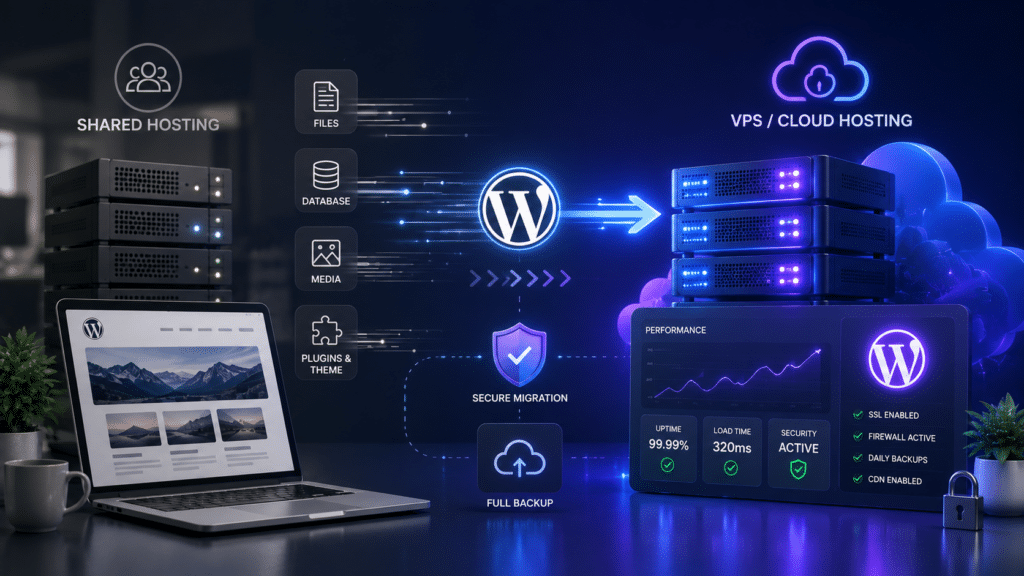
WordPress hosting migrations carry inherent risks including data loss, extended downtime, broken functionality, and DNS propagation delays that disrupt business operations when executed without systematic planning and testing procedures. Successful migrations minimize downtime to hours or minutes rather than days while preserving all site functionality, user data, and search engine rankings through careful execution and contingency planning.
The optimal migration timing occurs during established low-traffic periods rather than reactive responses to performance crises or hosting failures. Planning migrations around business cycles prevents disruption during peak seasons—e-commerce sites avoid migrations during holiday shopping periods while B2B sites schedule weekend migrations when business user traffic reaches minimum levels.
WordPress Hosting Migration Checklist:
- Pre-Migration Preparation:
- Complete site backup including database, wp-content folder, and configuration files
- Document current hosting configuration including PHP version, memory limits, and active extensions
- Test backup restoration on local development environment verifying completeness
- Audit and update all plugins and themes to current versions ensuring compatibility
- Create detailed DNS record inventory including A records, MX records, and third-party service integrations
- New Hosting Setup:
- Provision new VPS or cloud hosting with specifications matching or exceeding current requirements
- Configure server environment matching current PHP version, MySQL version, and extensions
- Install WordPress core matching current version or testing upgrade path
- Configure SSL certificate before migration to prevent mixed content warnings
- Implement security hardening appropriate to business sensitivity level
- Data Migration Execution:
- Transfer database through phpMyAdmin export/import or command-line database dump
- Upload wp-content directory via SFTP preserving file permissions and directory structure
- Verify wp-config.php database credentials and update siteurl and home values
- Test site functionality thoroughly on new server using hosts file DNS override
- Verify all forms, plugins, payment processing, and user authentication function correctly
- DNS Cutover and Monitoring:
- Reduce DNS TTL values 24-48 hours before migration enabling faster propagation
- Update DNS A records pointing domain to new server IP address
- Monitor both old and new servers during DNS propagation period (typically 4-48 hours)
- Verify site accessibility from multiple locations and ISPs confirming global DNS propagation
- Maintain old hosting active for 7-14 days after migration as rollback failsafe
Professional migration services from hosting providers or WordPress specialists like WP Enchant eliminate technical complexity and risk for businesses lacking in-house IT expertise. Managed migrations typically include pre-migration testing, zero-downtime cutover procedures, and post-migration optimization ensuring superior performance from upgraded infrastructure.
Common migration pitfalls include incomplete backups missing custom themes or third-party integrations, database search-replace operations corrupting serialized data, permission issues preventing file uploads or plugin updates, and caching conflicts creating persistent outdated content display. Systematic testing procedures identify these issues before DNS cutover when corrections remain simple rather than discovering problems after public-facing migration.
Database search-replace operations require specialized tools preserving serialized data integrity. WordPress stores certain settings and plugin configurations as serialized PHP arrays that break when naive find-replace operations alter string lengths without updating serialization metadata. WP-CLI’s search-replace command or specialized tools like Better Search Replace handle serialization correctly preventing data corruption.
Post-migration optimization typically delivers performance improvements beyond infrastructure upgrade alone. Fresh server configurations enable implementing PHP version upgrades, enabling OPcache acceleration, configuring object caching through Redis or Memcached, and optimizing database tables that accumulated fragmentation over time. These optimization opportunities make migration ideal timing for comprehensive performance enhancement rather than simple like-for-like server replacement.
Evaluating Hosting Provider Support Quality and Business Alignment
Technical support quality and business alignment determine long-term hosting satisfaction beyond initial performance benchmarks, particularly when encountering server issues, security incidents, or scaling challenges requiring provider expertise and responsiveness. Support quality varies dramatically between hosting providers with some offering 24/7 expert WordPress support while others provide limited business-hours assistance through general hosting technicians lacking WordPress-specific expertise.
Support channel availability impacts issue resolution speed during critical situations. Phone support enables immediate expert consultation for urgent problems, live chat provides faster response than email tickets while documenting conversations, and ticket systems work effectively for non-urgent questions and feature requests. Premium hosting providers offer multi-channel support allowing issue escalation through appropriate channels based on urgency and complexity.
Response time guarantees separate premium from budget hosting services. Enterprise SLAs often guarantee 15-minute initial response times for critical issues and 1-hour response for standard support requests, while budget providers may take 24-48 hours responding to support tickets during high-volume periods. This responsiveness difference proves critical when addressing site downtime, security breaches, or payment processing failures directly impacting revenue.
Hosting Support Evaluation Criteria:
| Factor | Budget Hosting | Mid-Tier Hosting | Premium Managed Hosting |
|---|---|---|---|
| Support Hours | Business hours only | 24/7 ticket system | 24/7 phone, chat, ticket |
| Technical Expertise | General hosting | Server administration | WordPress specialists |
| Response Time | 24-48 hours | 4-12 hours | 15 minutes – 2 hours |
| Support Channels | Email/ticket only | Ticket + chat | Phone + chat + ticket + priority |
| Proactive Monitoring | None | Basic uptime checks | Comprehensive performance monitoring |
WordPress-specific expertise matters significantly for business sites encountering plugin conflicts, theme compatibility issues, or performance optimization requiring platform knowledge beyond general server administration. Managed WordPress hosting providers staff support teams with WordPress specialists capable of troubleshooting complex plugin interactions, recommending performance optimizations, and implementing security hardening specific to WordPress vulnerabilities.
Proactive monitoring and incident response separate premium providers from budget services. Quality managed hosting includes automated malware scanning, plugin vulnerability monitoring, uptime checks with automated incident response, and performance degradation alerts enabling issue resolution before customer impact. These proactive measures prevent problems rather than simply responding to failures after they occur.
Migration assistance and onboarding support prove particularly valuable for businesses transitioning from DIY hosting to managed solutions. Quality providers offer complimentary migration services, dedicated onboarding consultations explaining hosting features and optimization opportunities, and comprehensive documentation enabling efficient platform utilization. This support infrastructure reduces friction during provider transitions while ensuring businesses fully leverage upgraded hosting capabilities.
WP Enchant partners with businesses requiring ongoing WordPress maintenance extending beyond basic hosting support, providing plugin management, security monitoring, performance optimization, and content updates that hosting providers typically exclude from standard support agreements. This comprehensive maintenance approach combines premium hosting infrastructure with dedicated WordPress expertise ensuring optimal site performance and security.
Making the Right WordPress Hosting Decision for Your Business
Optimal WordPress hosting selection balances current operational requirements with anticipated growth trajectory, aligning infrastructure capabilities with business model characteristics while maintaining budget sustainability and avoiding premature enterprise investment. The hosting decision impacts every aspect of website performance from user experience and conversion rates to search rankings and operational reliability.
Start with honest traffic assessment and growth projections based on historical data and marketing plans rather than aspirational targets. Sites with steady 5,000 monthly visitors rarely require VPS hosting regardless of future growth hopes, while sites experiencing 15,000+ monthly visitors with increasing trends benefit from proactive VPS migration before shared hosting limitations impact user experience.
Consider total cost of ownership beyond promotional pricing and introductory discounts. Shared hosting advertised at $3.99 monthly often renews at $12.99 monthly after one-year promotions, while VPS hosting initially priced at $29.99 monthly may deliver superior long-term value through avoided performance issues and customer experience improvements driving higher conversion rates offsetting price differences.
Decision Framework:
- Choose Shared Hosting If: Traffic remains below 10,000 monthly visitors, budget constraints prevent higher investment, technical expertise limits ability to manage servers, site serves informational purposes without transaction processing
- Choose VPS Hosting If: Traffic ranges 10,000-100,000 monthly visitors, site processes payments or sensitive data, consistent performance impacts conversion rates, budget supports $30-100 monthly hosting investment
- Choose Cloud Hosting If: Traffic exceeds 100,000 monthly visitors or shows high variability, zero-downtime requirements justify premium pricing, business model supports $100-500+ monthly hosting costs, global audience requires geographic distribution
- Choose Managed WordPress If: Technical expertise unavailable in-house, time constraints prevent server management, premium support justifies price premium, business prioritizes reliability over cost optimization
Testing before committing provides empirical performance data eliminating guesswork. Most quality hosting providers offer 30-day money-back guarantees enabling risk-free evaluation. Migrate development or staging sites to prospective hosting, conduct realistic load testing, evaluate support responsiveness, and verify all business-critical functionality before committing production sites.
Scalability planning prevents disruptive future migrations. Select hosting providers offering clear upgrade paths from shared to VPS to cloud infrastructure enabling seamless growth without provider changes. Platform continuity preserves institutional knowledge while avoiding repeated learning curves associated with migrating between drastically different hosting environments.
WP Enchant provides comprehensive hosting consultations evaluating business requirements, technical specifications, and growth projections to recommend optimal hosting solutions aligned with operational needs and budget realities. Our ongoing maintenance services ensure businesses fully leverage hosting capabilities through performance optimization, security hardening, and proactive monitoring regardless of infrastructure tier.
Conclusion
Selecting optimal WordPress hosting for business requires analyzing your specific business model, traffic patterns, performance requirements, and growth trajectory rather than choosing based on promotional pricing or feature checklists. The hosting infrastructure you select impacts every aspect of website performance from page load speeds and uptime reliability to security posture and scaling capabilities during traffic surges.
Shared hosting serves effectively for small businesses and portfolio sites with modest traffic, while VPS hosting delivers the performance consistency and security appropriate for growing businesses and e-commerce operations. Cloud hosting provides enterprise-grade reliability and elastic scaling for high-traffic sites with variable demand patterns or zero-tolerance for downtime impacting revenue generation.
Successful hosting decisions balance current operational requirements with anticipated growth, avoiding both under-provisioning that creates performance bottlenecks and over-investing in enterprise infrastructure delivering marginal benefits for small-scale operations. Regular performance monitoring, systematic testing, and proactive upgrades before capacity constraints impact customer experience ensure hosting infrastructure supports rather than limits business growth.
WP Enchant helps businesses navigate hosting complexity through expert consultation, managed migration services, and comprehensive maintenance ensuring optimal WordPress performance regardless of hosting infrastructure tier or business operational requirements.
Frequently Asked Questions
1. When should I upgrade from shared hosting to VPS for my WordPress business site?
Upgrade from shared hosting to VPS when your site consistently receives 10,000-15,000+ monthly visitors, experiences noticeable performance degradation during peak traffic periods, requires enhanced security for payment processing or sensitive customer data, or needs custom server configurations unavailable on shared infrastructure. Monitor key performance indicators including average page load times exceeding 3 seconds, database query times increasing over time, and hosting resource usage approaching plan limits. These technical signals indicate shared hosting capacity constraints requiring VPS upgrade for maintaining optimal user experience. Additionally, businesses experiencing revenue impact from periodic downtime or slow page speeds during promotional campaigns benefit from VPS reliability and dedicated resource allocation that prevents neighbor site activity from affecting your performance. WP Enchant provides hosting performance analysis identifying optimal upgrade timing based on actual usage patterns rather than arbitrary visitor count thresholds.
2. How much should I budget for WordPress hosting based on my business model?
Budget shared hosting costs between $10-30 monthly for portfolio sites and small businesses with traffic below 10,000 monthly visitors. Growing businesses and small e-commerce sites should allocate $30-100 monthly for quality VPS hosting providing dedicated resources and enhanced security. Established e-commerce operations and high-traffic content sites require $100-300 monthly for cloud hosting or managed WordPress solutions delivering enterprise-grade reliability. Enterprise organizations should expect $300-1,000+ monthly for dedicated servers or custom cloud infrastructure with comprehensive support and performance SLAs. These ranges represent total hosting costs including domain registration, SSL certificates, automated backups, and security features rather than promotional pricing often advertised excluding essential services. Calculate total cost of ownership across annual periods rather than comparing introductory monthly rates that expire after initial contract terms. WP Enchant helps businesses optimize hosting budgets while ensuring infrastructure meets operational requirements.
3. What performance benchmarks indicate I need better WordPress hosting?
Critical performance benchmarks signaling hosting inadequacy include Time to First Byte (TTFB) consistently exceeding 500 milliseconds indicating slow server response, uptime below 99.9% creating frequent accessibility issues, page load times above 3 seconds on standard broadband connections, database query times increasing despite optimization efforts, and resource limit warnings from hosting provider indicating plan capacity constraints. Additionally, monitor Core Web Vitals metrics with Largest Contentful Paint (LCP) exceeding 2.5 seconds, Interaction to Next Paint (INP) above 200 milliseconds, and Cumulative Layout Shift (CLS) greater than 0.1 suggesting infrastructure cannot support optimal user experience regardless of optimization efforts. These performance degradations directly impact search rankings, conversion rates, and user satisfaction making hosting upgrades high-ROI investments rather than optional expenses. WP Enchant implements comprehensive performance monitoring tracking these metrics over time identifying hosting bottlenecks versus code optimization opportunities.
4. Should I choose managed WordPress hosting or self-managed VPS hosting?
Choose managed WordPress hosting if you lack technical expertise for server administration, value comprehensive support and proactive maintenance over cost savings, require WordPress-specific optimization and security features, and prioritize time efficiency over manual server management. Managed hosting eliminates technical complexity while delivering expert WordPress optimization, automatic updates, security monitoring, and backup management. Self-managed VPS hosting suits businesses with technical personnel capable of server administration, requiring custom software configurations unavailable on managed platforms, operating multiple applications beyond WordPress on single servers, and prioritizing cost optimization through hands-on management. VPS hosting provides root access enabling unlimited customization while requiring expertise in Linux administration, security hardening, and performance optimization. For most businesses, managed WordPress hosting delivers superior total value through reduced management overhead and expert optimization despite higher per-month costs compared to self-managed alternatives. WP Enchant offers managed maintenance services bridging this gap by providing expert WordPress management on business-controlled VPS infrastructure.
5. How do I test WordPress hosting performance before migrating my business site?
Test hosting performance through systematic evaluation including creating temporary test sites on prospective hosting, using tools like GTmetrix and Google PageSpeed Insights measuring actual load times, conducting load testing with services like K6 or LoadStorm simulating concurrent user sessions, monitoring uptime through StatusCake or UptimeRobot over 30-day evaluation periods, testing support responsiveness by submitting non-urgent tickets measuring response quality and speed, and verifying all business-critical functionality including payment processing, form submissions, and membership features work correctly on new infrastructure. Most quality hosting providers offer 30-day money-back guarantees enabling risk-free testing with actual site data rather than relying on synthetic benchmarks or marketing claims. Document baseline performance metrics from current hosting including average TTFB, page load times, and uptime percentages enabling direct comparison with prospective providers. WP Enchant conducts comprehensive hosting performance testing for clients evaluating migration opportunities, providing objective data supporting infrastructure investment decisions.
References
1: HostingStep, “WordPress Hosting Benchmarks 2026: 24/7, 365 Days Tested,” 2026. Q4 2025 uptime data: Pressable, WordPress.com, and EasyWP recorded 100% uptime. https://hostingstep.com/wordpress-hosting-benchmarks
2: Digital Applied, “Web Performance Impact on Conversions,” 2025. A 500-millisecond delay in page load times reduces conversion rates by approximately 7%. https://www.digitalapplied.com/blog/web-performance-conversion-impact
3: InMotion Hosting, “2026 Web Performance Standards: Guide Faster Websites,” 2026. WordPress powers 40% of all websites; uptime calculations and performance standards. https://www.inmotionhosting.com/blog/web-performance-benchmarks







One comment
[…] evaluating hosting options, understanding how to select WordPress hosting for business models requires considering these critical performance […]