So, you’re ready to build a website and wondering which platform to choose. Chances are, you’ve narrowed it down to three top contenders: Wix vs Squarespace vs WordPress.
This comparison walks through pricing, features, ease of use, flexibility, and best use cases so you can confidently choose the right website builder for your business, blog, or online store.
Quick Comparison: Wix vs Squarespace vs WordPress
Use this overview table to quickly see how Wix, Squarespace, and WordPress stack up.
At-a-Glance Comparison
| Platform | Starting Price* | Best For | Ease of Use | Key Features | Flexibility | Scalability |
|---|---|---|---|---|---|---|
| Wix | From ~$16/mo (website) | Beginners, small businesses, portfolios | Very easy (drag & drop) | Hundreds of templates, app market, built‑in SEO, basic e‑commerce | Medium (visual editor, apps) | Good for small–mid sized sites |
| Squarespace | From ~$16/mo (annual) | Creatives, brands, small stores, portfolios | Easy (structured editor) | Award‑winning designs, strong blogging, built‑in e‑commerce & scheduling | Medium‑High (templates, CSS) | Strong for small–growing brands |
| WordPress.org | Free core (hosting from ~$5–10/mo) | Blogs, content sites, complex or custom sites | Moderate (learning curve) | 59k+ plugins, full blog & CMS, full design control, powerful SEO | Very high (themes, custom code) | Excellent for large & complex sites |
*Prices approximate and depend on region, billing cycle, and promos.
Let’s Dive Deep Into Each Platform
Below, we’ll compare Wix vs Squarespace vs WordPress in detail, and also look at the key matchups:
- Wix vs Squarespace
- Wix vs WordPress
- Squarespace vs WordPress
What is Wix?
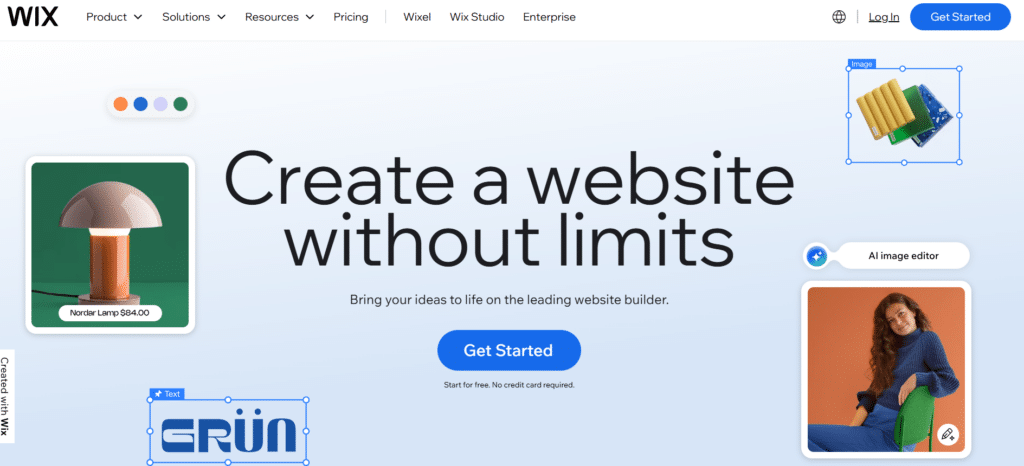
Wix is a fully hosted, drag‑and‑drop website builder aimed at beginners and small businesses. Currently, BuiltWith detects approximately 8.7 million live websites worldwide that are actively using Wix as their website builder.
You design visually—no coding required—and Wix handles hosting, security, and updates.
- True drag‑and‑drop editor (place elements anywhere on the page)
- 800+ designer‑made templates
- Wix App Market with hundreds of add‑ons (forms, booking, live chat, etc.)
- Built‑in SEO tools and basic marketing automation
- E‑commerce for physical and digital products (on higher plans)
- Wix ADI (Artificial Design Intelligence) to generate a starter site automatically
- Built‑in blogging and basic membership areas
Pros
- Extremely beginner‑friendly; almost no learning curve
- All‑in‑one: hosting, security, and updates are handled for you
- Large template library with niche options (restaurants, salons, coaches, etc.)
- Visual drag‑and‑drop gives full control over layout
- App Market extends functionality without coding
Cons
- Harder to switch templates later without redesigning
- Less flexible than WordPress for advanced or custom features
- Can become more expensive as you add apps and features
- Not ideal for very large, complex sites or custom web apps
- Changing platforms later (e.g., Wix → WordPress) can be painful
Wix Is Best For
- Solo entrepreneurs, freelancers, and small service businesses
- Local businesses needing a simple brochure site or booking site
- Beginners who want something that “just works” without tech headaches
- Users who value ease of use more than deep customization
Wix Pricing (Typical)
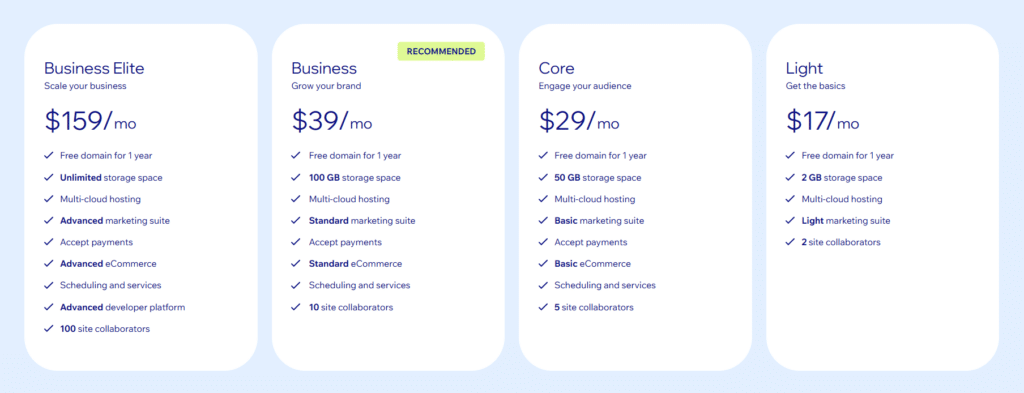
- Light: ~ $17/mo – Personal use (no ads, custom domain)
- Core: ~ $22/mo – Freelancers & entrepreneurs
- Business: ~ $39/mo – Accept payments (e‑commerce)
- Business Elite: $159/mo – Higher limits and more advanced features
(Pricing varies by region and promotions.)
Wix is ideal if you want the fastest, easiest path to a professional‑looking site and don’t need extreme customization. For many small businesses, Wix is “good enough” and highly convenient.
What is Squarespace?

Squarespace is a hosted website builder known for beautiful, modern designs. According to BuiltWith Trends, there are about 7.17 million live websites worldwide currently using Squarespace as their CMS/website platform. This data reflects actively detected live sites built with Squarespace.
It’s popular with creatives, small brands, and businesses that care about strong visual branding and a polished, high‑end look.
- Award‑winning mobile‑responsive templates
- Visual, section‑based editor (more structured than Wix)
- Built‑in blogging, portfolios, and e‑commerce
- Integrated email campaigns (via Squarespace Email Campaigns)
- Scheduling/booking (via Squarespace Scheduling/“Acuity” on some plans)
- Built‑in SEO and basic analytics
- Good support for membership areas and digital products
Pros
- Best‑in‑class design and typography out of the box
- All‑in‑one solution with hosting, SSL, security, and updates included
- Consistent, structured editing keeps designs clean and professional
- Strong built‑in blogging and e‑commerce features
- Good for photographers, designers, restaurants, and personal brands
Cons
- Less “pixel‑perfect” flexible than Wix’s freeform drag‑and‑drop
- Not as extensible as WordPress (limited app/extension ecosystem)
- Fewer templates than Wix (but higher average design quality)
- Some advanced customizations require CSS/JavaScript knowledge
- Transaction fees on lower e‑commerce plans (unless on Commerce plans)
Squarespace Is Best For
- Creatives: photographers, designers, artists, writers
- Lifestyle brands, personal brands, and small businesses focused on aesthetics
- Simple–medium online stores with relatively straightforward needs
- Users who want a polished, “designed” feel and are okay with some structure
Squarespace Pricing (Annual Billing)
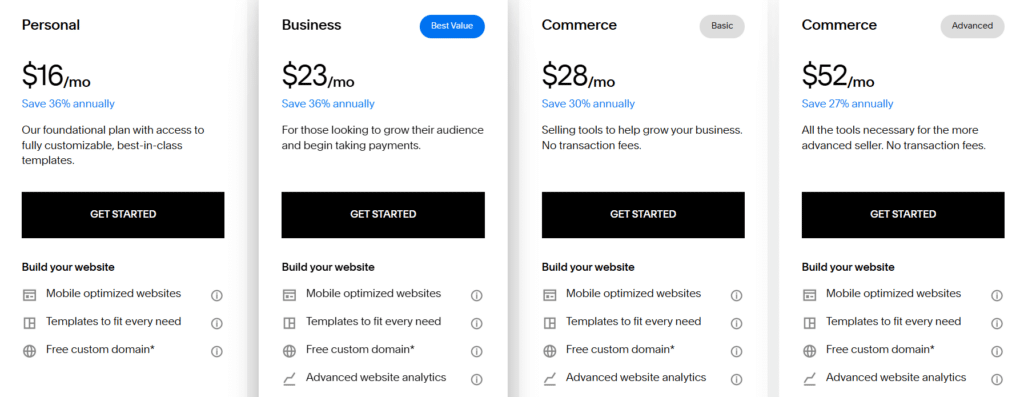
- Personal: ~ $16/mo – Basic site & blog
- Business: ~ $23/mo – More features, basic e‑commerce (transaction fees)
- Commerce Basic: ~ $28/mo – Full e‑commerce, no Squarespace transaction fees
- Commerce Advanced: ~ $52/mo – Advanced e‑commerce (subscriptions, advanced shipping, etc.)
Squarespace is the best fit if you want a beautiful, professional site with minimal tweaking—especially for visual brands and portfolio‑driven businesses. It’s easier than WordPress and more design‑focused than Wix’s template library overall.
What is WordPress
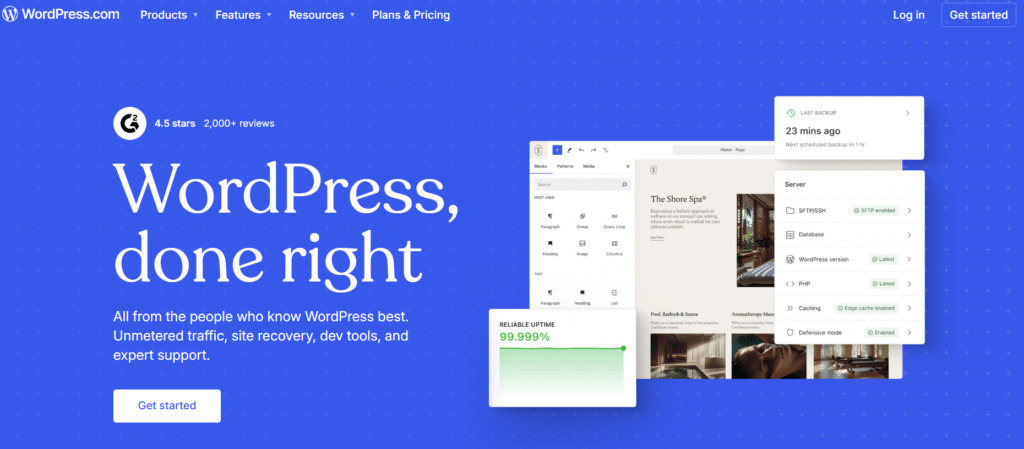
WordPress.com is a hosted website platform built on the WordPress software. According to BuiltWith Trends, over 36.8 million live websites worldwide are currently using WordPress as their content management system.
Instead of installing WordPress on your own hosting, you create an account on WordPress.com, and they handle the server, security, and core updates for you.
You can start for free on a yoursite.wordpress.com subdomain, then upgrade to paid plans to use a custom domain and unlock more features.
- Hosted and managed for you (no separate web host needed)
- Modern block editor for building pages and posts
- Excellent blogging and content management tools (great for SEO and content marketing)
- Large library of free and premium themes (more options on higher‑tier plans)
- Ability to install plugins and custom themes on Business/eCommerce‑level plans
- Built‑in tools for stats, basic SEO, and social sharing
- E‑commerce support on higher‑tier plans (powered by WooCommerce and other tools)
Pros
- No separate hosting setup—WordPress.com manages servers, security, and core updates
- Very strong for blogging and content‑driven sites
- Grows with you: start free/cheap, upgrade as you need more features
- Access to powerful plugins and custom themes on higher‑tier plans
- Less technical maintenance than self‑hosted WordPress.org
Cons
- Features vary a lot by plan; the powerful stuff (plugins, advanced customization) requires higher‑tier plans
- Less control over the server environment than WordPress.org
- On lower‑tier plans, you can’t install arbitrary plugins or fully custom themes
- Can become more expensive than basic shared hosting if you need advanced features
- Still has a learning curve compared to ultra‑simple site builders
WordPress Is Best For
- Bloggers, publishers, and content‑marketing‑driven businesses
- People who want WordPress’s power without managing their own hosting
- Small to medium businesses that may grow into more advanced SEO or features
- Users who might eventually need more flexibility (via plugins) but don’t want technical server work
- Content‑heavy sites, online magazines, and documentation sites
WordPress Pricing (Typical Setup)
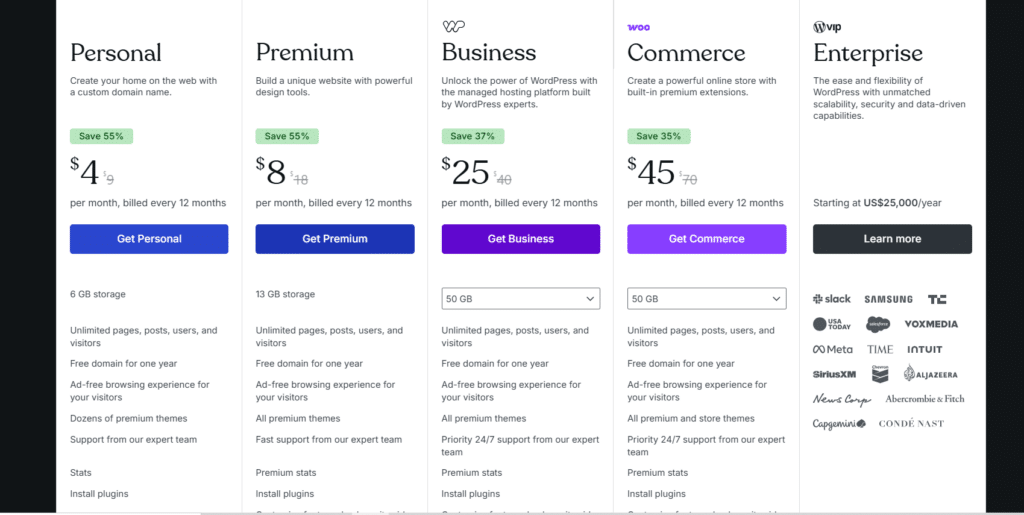
(Exact prices change, but this is the general pattern.)
Personal: ~ $4/mo – Basic website with custom domain, ideal for simple blogs or personal sites
Premium: ~ $8/mo – Better design tools, more storage, great for small portfolios or creative sites
Business: ~ $25/mo – Advanced customization, plugin support, and more control (best for growing websites)
Commerce: ~ $45/mo – Full e-commerce features with built-in premium extensions for online stores
Enterprise: Starts at ~$25,000/year – High-performance, scalable hosting for large brands
WordPress is the most content‑focused and scalable option in this Wix vs Squarespace vs WordPress comparison—especially on higher‑tier plans. It’s ideal if you’re serious about blogging, SEO, and long‑term growth, and you want WordPress power with less technical server management.
Wix vs Squarespace
This Squarespace vs Wix vs WordPress breakdown starts with the two hosted builders.
Editor & Ease of Use
- Wix: True drag‑and‑drop. You can place elements almost anywhere. Very intuitive, but easy to create inconsistent designs if you’re not careful.
- Squarespace: Section‑based, structured editor. Less freedom but more consistent, professional layouts.
Winner (Ease of Use):
- Wix for absolute beginners who want total freedom.
- Squarespace if you want guardrails that keep things looking professional.
Design & Templates
- Wix: 800+ templates across many niches. Some look dated; newer ones are strong. You can customize heavily.
- Squarespace: Fewer templates, but nearly all are modern, minimal, and visually strong out of the box.
Winner (Design Quality): Squarespace.
Features & Apps
- Wix:
- App Market with many third‑party integrations
- Wix-specific tools: Wix Bookings, Wix Restaurants, Wix Events, etc.
- Squarespace:
- Fewer extensions but strong built‑in tools (e‑commerce, scheduling, email campaigns)
- Integrates well with creative workflows and portfolios
Winner (Built‑In Features): Squarespace for polished, integrated features.
Winner (Third‑Party Apps): Wix.
SEO & Blogging
- Both offer basic SEO tools (titles, meta descriptions, URL customization).
- Squarespace arguably has cleaner code output and better blogging structure.
- Wix has improved SEO significantly in recent years, but still not as flexible as WordPress.
Winner (Blogging & SEO between these two): Slight edge to Squarespace.
Pricing
Both start around $16–$20 per month for standard sites.
- Wix can become pricier as you add apps.
- Squarespace’s plans are more bundled and predictable.
Winner (Pricing predictability): Squarespace, but the difference is small.
Final Verdict: Wix vs Squarespace
- Choose Wix if you:
- Want maximum design freedom with drag‑and‑drop
- Are a beginner and want the easiest possible start
- Need specific niche features via Wix’s App Market
- Choose Squarespace if you:
- Care most about clean, premium design
- Are a creative or brand‑focused business
- Want strong built‑in blogging and simple e‑commerce
Wix vs WordPress
This Wix vs WordPress vs Squarespace comparison becomes more about ease vs power when we bring in WordPress.
Ease of Use
- Wix: Fully hosted, visual, drag‑and‑drop; site setup is guided.
- WordPress: Requires a domain + hosting setup, then learning the dashboard, themes, and plugins.
Winner (Ease of Use): Wix by a large margin.
Flexibility & Customization
- Wix: Good flexibility for small to medium sites; app market adds extra features but still within Wix’s ecosystem.
- WordPress: Nearly unlimited flexibility—custom post types, advanced SEO, membership sites, learning platforms, etc.
Winner (Flexibility): WordPress, easily.
Cost Over Time
- Wix: Flat monthly fee; add‑on apps may increase cost.
- WordPress: Can be cheap at first (budget hosting + free theme/plugins), but serious sites may require better hosting and some paid tools.
Winner (Budget‑Friendly):
- Very small/basic sites: Wix may be simpler and cost‑effective.
- Long‑term growth and multiple sites: WordPress often wins.
SEO & Content
- Wix: Good enough SEO for most small businesses; basic blogging.
- WordPress: Industry standard for blogging and content marketing (plugins like Yoast SEO, Rank Math, etc.).
Winner (Blogging & SEO): WordPress.
Ownership & Portability
- Wix: Hosted platform—you’re tied to Wix’s ecosystem. Migrating away is limited and manual.
- WordPress: You own your site and database; migrating hosts or redesigning is straightforward.
Winner (Ownership): WordPress.
Final Verdict: Wix vs WordPress
- Choose Wix if you:
- Want to avoid technical setup entirely
- Need a small, simple site (and don’t expect complex future requirements)
- Value convenience over maximum control
- Choose WordPress if you:
- Plan to publish a lot of content (blog, resources, SEO)
- Need advanced features now or in the future
- Care about owning your data and being able to move hosts easily
Squarespace vs WordPress
Now let’s compare Squarespace vs Wix vs WordPress directly from the angle of Squarespace vs WordPress.
Ease of Use
- Squarespace: Fully hosted; structured editor; clear templates and blocks.
- WordPress: More complex setup and more moving parts (hosting, themes, plugins).
Winner (Ease of Use): Squarespace.
Design & Branding
- Squarespace: Exceptional default designs, typography, and layout. Perfect for portfolios and premium brands.
- WordPress: Design depends heavily on the theme; with a good theme or page builder, it can be just as good, but requires more effort.
Winner (Out‑of‑the‑box Design): Squarespace.
Flexibility & Features
- Squarespace: Great for typical business sites, portfolios, and small stores. Limited beyond that scope.
- WordPress: Can handle anything from blogs and membership sites to learning platforms and complex custom applications.
Winner (Flexibility): WordPress.
E‑commerce
- Squarespace: Simple, integrated e‑commerce; perfect for smaller catalogs and straightforward checkout.
- WordPress (with WooCommerce or similar):
- More configuration, but far more powerful: multi‑currency, subscriptions, complex variants, etc.
Winner (Simple Stores): Squarespace.
Winner (Complex Stores): WordPress.
Scaling & Long‑Term Use
- Squarespace: Perfect for small–mid-sized businesses; less ideal for highly complex or large content sites.
- WordPress: Scales from small blogs to enterprise if hosted and optimized properly.
Winner (Scalability): WordPress.
Final Verdict: Squarespace vs WordPress
- Choose Squarespace if you:
- Want a beautiful, branded site quickly
- Run a small business, creative practice, or simple product shop
- Prefer an all‑in‑one platform with minimal tech hassle
- Choose WordPress if you:
- Are you building content or SEO‑heavy websites
- Need features beyond “standard” business or portfolio sites
- Expect to scale or customize heavily over time
Full Comparison: Wix vs Squarespace vs WordPress
Here’s a consolidated view of Wix vs Squarespace vs WordPress so you can decide by use case.
Table 2: Best Platform by Scenario
| Use Case / Priority | Best Choice | Why |
|---|---|---|
| Superior blogging tools, SEO plugins, and scalability | Wix | Easiest drag‑and‑drop, guided setup |
| High‑end visual portfolio or brand site | Squarespace | Best default designs, polished layouts |
| Content‑heavy blog or SEO‑driven website | WordPress | Superior blogging tools, SEO plugins, scalability |
| Small local business (services, bookings) | Wix or Squarespace | Wix for niche apps; Squarespace for design‑driven brands |
| Long‑term, scalable business website | WordPress | Flexibility, control, and portability |
| Simple online store (small catalog) | Squarespace | Built‑in e‑commerce, no plugins needed |
| Complex or large e‑commerce store | WordPress (WooCommerce) | Advanced features, custom workflows |
| “Set it and forget it” low‑maintenance site | Wix or Squarespace | All‑in‑one hosting and updates handled |
| Maximum customization and integrations | WordPress | Open ecosystem, thousands of plugins and themes |
Clear Recommendations Based on Your Situation
Use these quick rules to decide which platform to start with in the Wix vs Squarespace vs WordPress debate:
- You’re non‑technical and want the site live this week
→ Start with Wix or Squarespace.- Choose Wix if you want drag‑and‑drop freedom and lots of niche templates.
- Choose Squarespace if you care more about premium, on‑brand design.
- You’re a creative (photographer, designer, writer, coach)
→ Choose Squarespace. You’ll get a beautiful portfolio or site with minimal tweaking. - You’re building a long‑term business, blog, or content hub
→ Choose WordPress. It’s the best for SEO, content, and scaling over time. - You want a simple online store with 10–100 products
→ Choose Squarespace or Wix.- Squarespace for brand‑focused stores and clean design.
- Wix if you want more control over layout and use of specialized apps.
- You expect complex features (membership, LMS, advanced e‑commerce)
→ Choose WordPress. It gives you maximum flexibility and growth potential.
FAQ: Wix vs Squarespace vs WordPress
Which is better overall: Wix, Squarespace, or WordPress?
There’s no universal “best” in the Wix vs Squarespace vs WordPress debate. Simply, no one-size-fits-all answer. WordPress is generally preferred for sites that need scalability and advanced features, Wix works well for beginners who want simplicity, and Squarespace shines for design-focused sites.
The best platform depends on your goals, budget, and technical comfort. Each builder has strengths in different areas, and choosing the right one can save you time and money.
Is WordPress harder to use than Wix and Squarespace?
Yes. WordPress has a steeper learning curve because you handle hosting, themes, and plugins. However, once set up, it offers far more flexibility than Wix or Squarespace.
Can I move my site later from Wix or Squarespace to WordPress?
You can migrate content (like text and images) manually or with partial tools, but it’s not seamless. Your design will not transfer 1:1. If you think you’ll want maximum flexibility in the future, starting with WordPress may be smarter.
Which is better for SEO: Wix vs WordPress vs Squarespace?
All three can rank in Google if you produce good content and optimize correctly. However:
Wix has improved a lot, but it is still less flexible than WordPress for advanced SEO.
WordPress offers the most SEO control and tools.
Squarespace has solid built‑in SEO and clean code.
Which platform is cheapest in the long run?
It depends on your needs:
For a growing business or multiple sites, WordPress can be more cost‑effective because you can choose your hosting and reuse themes/plugins across multiple projects.
For a basic small site, Wix or Squarespace costs are predictable and straightforward.
What You Should Do Next
- Define your top priority:
- Ease of use?
- Design quality?
- Flexibility and growth?
- Pick your platform based on that priority:
- Wix – if you want the easiest, fastest build.
- Squarespace – if you want a beautiful, branded design with minimal effort.
- WordPress – if you’re serious about content, SEO, and long‑term flexibility.
- Take the next step:
- Visit Wix, Squarespace, or your chosen WordPress host and start with a basic plan.
- Build a simple version of your site first; you can always improve it later.
Need Help With WordPress?
If you decide WordPress.com is the right platform but don’t want to deal with the technical side, a specialist service like WP Enchant can bridge the gap between DIY and hiring a full‑time developer.
WP Enchant focuses exclusively on WordPress and offers:
- Monthly WordPress Care Plans – Ongoing site management that typically includes updates, security monitoring, backups, performance checks, and uptime monitoring, so your site stays fast, secure, and stable without you having to log into the dashboard every day.
- Unlimited Small Fixes & Support – Many care plans include “unlimited small jobs” (for example: fixing layout issues, tweaking CSS, installing/configuring plugins, or resolving error messages), which is ideal if you regularly need small tweaks but don’t want to hire a freelancer each time.
- Performance & Security Optimization – They help harden your site against hacks and malware, and optimize caching, images, and database settings so pages load quickly for visitors.
- WooCommerce & Business Sites – If you’re running an online store or a business website, they can keep your e‑commerce setup healthy and troubleshoot issues that might otherwise impact sales or leads.
- White‑Label & Agency‑Friendly Options – If you build sites for clients, WP Enchant also offers services that agencies can resell under their own brand, offloading the day‑to‑day maintenance work.
This kind of ongoing support is particularly valuable with WordPress because, unlike Wix or Squarespace, you (or someone on your team) are responsible for keeping the site updated and secure. Using a service like WP Enchant lets you keep the flexibility and power of WordPress while outsourcing the technical workload to a dedicated team.
If you’re leaning toward WordPress but are worried about the learning curve, budgeting for a care plan from a provider like WP Enchant can make WordPress feel as “hands‑off” as the fully hosted builders—without giving up the customizability that makes WordPress so attractive.